

The honest answer on native apps
Casinia runs in your mobile browser rather than as a downloadable application. You won't find a dedicated iOS or Android app in the App Store or Google Play – instead, the operator's platform is built to work directly through Safari, Chrome, Firefox or any other modern browser on your phone or tablet. This means access without installation, no storage footprint on your device, and no separate update cycle to manage. You use the same account credentials as on desktop, and your balance, transaction history and open bets carry across devices automatically.
The trade-off is straightforward: a browser-based site can feel slightly less immediate than a native app – scrolling through a long game library or switching between the sportsbook and your account page involves page loads rather than instant transitions – but the operator has clearly optimised the mobile layout to reduce friction. Pages render quickly on a decent 4G or Wi-Fi connection, and the core actions (placing a bet, starting a slot, checking your balance) sit one or two taps away from the homepage. No QR codes, no APK files, no permissions to grant – you type the operator's address into your browser, log in, and the platform loads in its mobile version.
The browser route in practice
Getting started takes three steps, each one quick enough to complete while standing in a queue:
- Open your mobile browser and navigate to the operator's domain – the same address you'd use on a laptop.
- Tap the login button (usually top-right on the mobile layout) and enter your username and password.
- The platform recognises the screen size and serves its mobile interface automatically – no toggle, no separate m. subdomain.
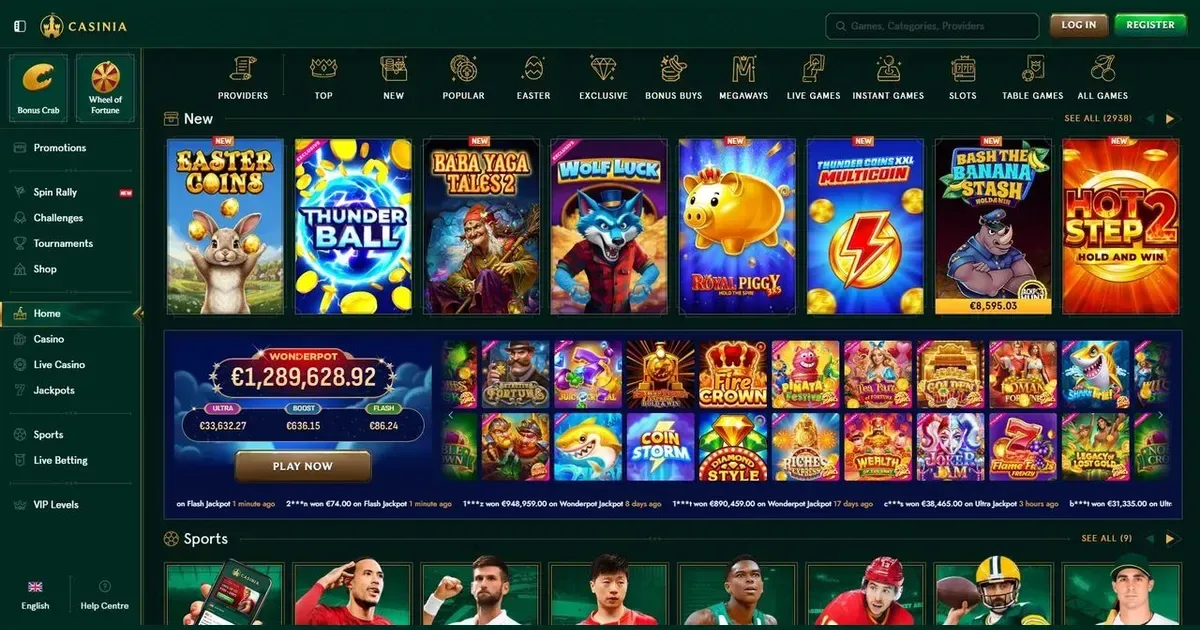
Once you're logged in, the homepage presents a scrollable grid: featured games near the top, category filters (slots, live games, table games, jackpots) a swipe away, and a persistent account icon that opens your balance, deposit options and transaction history. The search bar works as it does on desktop – type a game title or provider name and the list narrows in real time. Your first deposit, your verification documents, your responsible-gambling limits – all of them accessible through the same menu structure as the desktop site, just reformatted to fit a portrait screen.
The operator clearly puts the games front and centre: measured by thumb reach, slots and live dealer tables sit within one tap of the landing screen, while the sportsbook occupies its own tab in the main navigation. The cashier takes two taps to reach (account menu, then deposit or withdraw), which is standard for browser-based mobile sites. What stands out: the platform remembers your last-used payment method and pre-fills the amount field with the minimum qualifying deposit, shaving a few seconds off repeat transactions.
Features that survive the small screen
A significant portion of what you can do on desktop remains intact on mobile. Game selection covers the full library – providers don't tend to publish separate mobile catalogues any more, so the slots, live tables and jackpot games you'd play on a laptop load just as readily on a phone. The live dealer feed adjusts its resolution to match your connection speed, which keeps the stream smooth even when you're on cellular data rather than Wi-Fi. Chat with the dealer and other players works through a collapsible overlay that doesn't block the table view, and bet placement follows the same tap-to-select, tap-to-confirm pattern as any other mobile betting interface.
The cashier functions without compromise: you can make deposits, request withdrawals, check pending transactions and review your payment history from the same account menu that holds your profile settings. The operator supports the same payment methods on mobile as on desktop – card payments, e-wallets and bank transfers all process identically, though you'll want to check whether your bank's own mobile site or app requires additional authentication steps. Verification uploads work through your phone's camera roll: the platform accepts photos of ID documents and proof of address directly from the browser, no need to email support or switch to a laptop.
Support channels carry over too. The live chat widget sits in the bottom corner of every page, and tapping it opens a conversation window that pushes the game or balance screen up rather than covering it entirely. Email support remains available at the address listed on the contact page, and response times don't vary by device. One thing to note: if you're mid-session in a slot or at a live table, incoming chat notifications appear as a small badge rather than an intrusive pop-up, which keeps them visible without interrupting a bonus round or a dealt hand.
Where mobile is worse than desktop
Some tasks simply don't translate well to a 6-inch screen. Comparing odds across multiple sports markets means a lot of scrolling – where a desktop layout shows six or eight events side by side, the mobile view stacks them vertically, so scanning a full fixture list takes longer. Multi-betting (building an accumulator with selections from different sports) works, but adding and removing legs feels more fiddly when each action reloads a narrow column of odds rather than updating a persistent betslip panel.
The game filters help you narrow a library of thousands of slots down to a handful of titles, but the grid itself shows fewer thumbnails per screen than desktop, which means more swiping to browse. If you know exactly which game you want, the search bar solves this; if you're exploring new releases or hunting for a half-remembered title, it's slower going. Live casino tables suffer a similar constraint: the platform can only fit two or three table previews on screen at once, so finding a blackjack table with your preferred bet limits involves more vertical scrolling than it would on a monitor.
Account settings and responsible-gambling tools sit several taps deep in the menu, which makes adjusting a deposit limit or setting a session reminder less immediate than it should be. On desktop, these controls typically occupy a sidebar or a dedicated account page; on mobile, they're nested under "Profile → Responsible Gambling → Set Limits", and the extra navigation feels like a barrier when you need to act quickly. Battery drain is real – an hour of live dealer play or sustained slot sessions with animations and sound will chew through 20–30% of a typical phone's charge, so keep a charger nearby if you plan to play for more than a short commute.
A short checklist before playing on mobile
These five checks take less than a minute and prevent most of the friction that turns a quick session into a frustrating one:
- Connection stability matters more than speed. A steady 4G signal beats flaky Wi-Fi – live games and sports betting both rely on real-time data, and a dropped connection mid-bet or mid-hand can leave a transaction in limbo. If you're playing on cellular data, check your allowance: an hour of slots uses roughly 30–50 MB, while live dealer streaming can run to 200–300 MB depending on video quality.
- Bookmark the operator's real address. Phishing sites often register near-identical domains with a single-letter swap, and typing on a phone keyboard makes these harder to spot. Save the correct URL after your first successful login, so subsequent visits go straight to the legitimate platform.
- Sign out when you're done, especially on a shared or public device. Browser-based play doesn't require biometric authentication by default, which means anyone who picks up your unlocked phone can access your account if the session is still active. Logging out takes two taps and removes that risk entirely.
- Set deposit and session limits before your first mobile session, not during it. The responsible-gambling controls are buried deeper in the mobile menu than on desktop, and adjusting them mid-session interrupts your flow. Handle this once, from a laptop if it's easier, and your phone sessions inherit the same limits automatically.
Responsible gambling on the go
The same deposit limits, wagering thresholds and self-exclusion tools available on desktop apply to your mobile sessions – there's one account, so the controls follow you across devices. If you've set a daily deposit cap or a session reminder on your laptop, those boundaries remain active when you log in from your phone. Worth remembering: a device you carry everywhere makes spontaneous play easier, which is precisely when preset limits prove their value. You must be 18 or over (18+) to access this operator. If gambling ever stops feeling like entertainment, free confidential support is available in the UK through BeGambleAware and the National Gambling Helpline on 0808 8020 133 (free, 24/7). Additional help: GamCare, GamStop (national self-exclusion), and blocking software such as Gamban or BetBlocker.
This page is provided for information and marketing purposes only. We are not a casino operator, bookmaker or organiser of gambling. Access to this content is restricted to those aged 18 and over (18+). If you need support with gambling, visit BeGambleAware.org for free, confidential help.